Hoy he creado una app completa mientras salía a correr 40 minutos.
La idea
Tenía apuntada esta idea en el bloc de notas desde hace tiempo:
8 seconds hug - La importancia de los abrazos, una app que lo recuerde
Y justo anoche me salió un artículo por Twitter que decía que los abrazos prolongados de pueden curar muchas situaciones. Y me recordó a la idea que tenía apuntada desde hacía tiempo con lo de los 8 segundos. Así que esta mañana me he puesto a ello mientras desayunaba.
El prompt inicial
Abrí ChatGPT y escribí el siguiente prompt.
se me ha ocurrido una idea de una app. seria llamada como 8secondshug, basada en la idea de que un abrazo ocasional de 8 segundos puede curar muchas cosas. me gustaria que pensaras si hay alguna app parecida., y hacer un plan completo de desarrollo de app si es asi. el output que quiero que me hagas es un prompt para generar una deep research con chatgpt.Con el resultado de la investigación, simplemente le dije:
Lo que quiero es que me des un plan híper mega detallado de todos los pasos que códex 5.4 tendría que implementar. Quiero un one shot porque es bastante sencilla la app. Que supere todas las pruebas de verificación de Apple. Y detalla muchísimo la interfaz también para que sea one shot. Dime si tienes alguna pregunta antesEl resultado fue bastante extenso al haber hecho la búsqueda con Deep Research. Iteré un par de veces con ChatGPT para refinar el prompt y que me diera un resultado más ajustado a lo que quería. Algo que me fue muy útil aquí fue usar la voz en vez de estar escribiendo delante del ordenador, mientras hacía un par de tareas de la casa.
Con todo el resultado que me dio ChatGPT, me lo llevé a Claude Code y dije:
Estaba pensando en una nueva idea de app simple, pero que me ayuda particularmente. Es un tracker o recordatorio diario de abrazar 8 segundos (al menos). Lo había hablado un poco con ChatGPT y acordamos esto, pero quiero que me redefinas tu bien porque no me fío mucho. Cómo sería una app de móvil, lo que querría tener es un tracking diario y notificaciones.El prompt del plan
Con todo el resumen que me dio ChatGPT, me fui a Claude Code (usando el modelo 4.6) y le dije que me generase un plan para implementar la app.
Lo que quiero es que me des un plan híper mega detallado de todos los pasos que códex 5.4 tendría que implementar. Quiero un one shot porque es bastante sencilla la app. Que supere todas las pruebas de verificación de Apple. Y detalla muchísimo la interfaz también para que sea one shot. Dime si tienes alguna pregunta antes

[Aquí pego todo el resumen que me dio ChatGPT]
Su resultado fue bastante impresionante.
Así que simplemente creé una carpeta nueva, abrí codex con:
codex —sandbox danger-full-access —ask-for-approval never
y pegué el prompt que me había dado Claude Code.
Algo a destacar es que en Codex uso el modelo gpt-5.4 xhigh y se nota muchísimo la calidad de la implementación.
A continuación dejo el prompt COMPLETO que me generó Claude Code. Es bastante extenso, pero así se lo había pedido para que lo implementase Codex de un one-shot.
Le di a ENTER y me fui a correr unos 40 minutos. Al volver, ya estaba listo el código.
Haga clic para ver el prompt completo
8 Seconds Hug — Plan de Ingeniería Completo para Codex
Versión one-shot · iOS + Android + Web · React Native + Expo
INSTRUCCIONES PARA CODEX
Lee este documento completo antes de escribir una sola línea. Implementa en el orden exacto de las fases. No omitas ningún archivo. Cada sección marcada con [CODEX] contiene instrucciones directas de implementación. No improvises colores, copy ni animaciones: están todos especificados.
FASE 0 — ENTORNO DE DESARROLLO
Requisitos del sistema
Node.js >= 20.x
npm >= 10.x
Expo CLI: npx expo (no instalar globalmente, usar siempre npx)
EAS CLI: npm install -g eas-cli
Xcode >= 15.x (para iOS)
Android Studio con SDK 34 (para Android)
Inicialización del proyecto
bashnpx create-expo-app@latest EightSecondsHug --template blank-typescript
cd EightSecondsHug
Configuración de EAS desde el inicio
basheas init --id <tu-project-id-de-expo>
Crea eas.json en la raíz:
json{
"cli": { "version": ">= 10.0.0" },
"build": {
"development": {
"developmentClient": true,
"distribution": "internal"
},
"preview": {
"distribution": "internal",
"ios": { "simulator": true }
},
"production": {
"autoIncrement": true
}
},
"submit": {
"production": {}
}
}
FASE 1 — ESTRUCTURA DE CARPETAS
[CODEX] Crea exactamente esta estructura. Cada archivo vacío que se lista se rellenará en fases posteriores.
EightSecondsHug/
├── app/ # Expo Router (file-based routing)
│ ├── _layout.tsx # Root layout con providers
│ ├── index.tsx # Home screen
│ ├── timer.tsx # Modal de abrazo
│ ├── posthug.tsx # Pantalla post-abrazo
│ ├── history.tsx # Historial
│ ├── settings.tsx # Ajustes
│ └── onboarding.tsx # Onboarding (solo primera vez)
├── src/
│ ├── components/
│ │ ├── HugButton.tsx
│ │ ├── BreathingCircle.tsx
│ │ ├── HugTimer.tsx
│ │ ├── ScienceCard.tsx
│ │ ├── StreakBadge.tsx
│ │ ├── CalendarGrid.tsx
│ │ ├── DayDot.tsx
│ │ └── SoftModal.tsx
│ ├── hooks/
│ │ ├── useHugStore.ts
│ │ ├── useNotifications.ts
│ │ ├── useHaptics.ts
│ │ └── useLocale.ts
│ ├── store/
│ │ └── hugStore.ts # Zustand store
│ ├── i18n/
│ │ ├── index.ts
│ │ ├── es.ts
│ │ └── en.ts
│ ├── constants/
│ │ ├── colors.ts
│ │ ├── typography.ts
│ │ ├── science.ts # Frases científicas
│ │ └── postHugMessages.ts # Mensajes post-abrazo
│ └── utils/
│ ├── dateUtils.ts
│ └── notifications.ts
├── assets/
│ ├── fonts/ # Nunito variable font
│ ├── images/
│ │ ├── icon.png # 1024x1024
│ │ ├── adaptive-icon.png # Android
│ │ ├── splash.png # 1284x2778
│ │ └── favicon.png # Web
│ └── animations/ # Lottie si se usan
├── app.json
├── babel.config.js
├── tsconfig.json
└── package.json
FASE 2 — DEPENDENCIAS
[CODEX] Instala exactamente estas versiones. No añadas nada más.
bashnpx expo install \
expo-router \
expo-notifications \
expo-haptics \
expo-localization \
expo-font \
@expo-google-fonts/nunito \
expo-splash-screen \
expo-linear-gradient \
expo-status-bar \
@react-native-async-storage/async-storage \
react-native-reanimated \
react-native-gesture-handler \
react-native-safe-area-context \
react-native-screens
npm install \
zustand \
i18next \
react-i18next \
date-fns
package.json — scripts obligatorios
json{
"main": "expo-router/entry",
"scripts": {
"start": "expo start",
"android": "expo run:android",
"ios": "expo run:ios",
"web": "expo start --web",
"build:ios": "eas build --platform ios",
"build:android": "eas build --platform android",
"submit:ios": "eas submit --platform ios",
"lint": "eslint . --ext .ts,.tsx",
"typecheck": "tsc --noEmit"
}
}
app.json completo
json{
"expo": {
"name": "8 Seconds Hug",
"slug": "eight-seconds-hug",
"version": "1.0.0",
"orientation": "portrait",
"userInterfaceStyle": "light",
"backgroundColor": "#FFF8F0",
"icon": "./assets/images/icon.png",
"scheme": "eightsecondshug",
"splash": {
"image": "./assets/images/splash.png",
"resizeMode": "contain",
"backgroundColor": "#FFF8F0"
},
"ios": {
"supportsTablet": false,
"bundleIdentifier": "com.tudominio.eightsecondshug",
"buildNumber": "1",
"infoPlist": {
"NSUserNotificationUsageDescription": "Usamos notificaciones solo para recordarte tu abrazo diario, a la hora que tú elijas.",
"UIRequiresFullScreen": true
},
"config": {
"usesNonExemptEncryption": false
}
},
"android": {
"adaptiveIcon": {
"foregroundImage": "./assets/images/adaptive-icon.png",
"backgroundColor": "#FFF8F0"
},
"package": "com.tudominio.eightsecondshug",
"versionCode": 1,
"permissions": ["RECEIVE_BOOT_COMPLETED", "VIBRATE"]
},
"web": {
"favicon": "./assets/images/favicon.png",
"bundler": "metro"
},
"plugins": [
"expo-router",
[
"expo-notifications",
{
"icon": "./assets/images/icon.png",
"color": "#FF8C69",
"sounds": []
}
],
"expo-font",
[
"expo-splash-screen",
{
"image": "./assets/images/splash.png",
"imageWidth": 200,
"resizeMode": "contain",
"backgroundColor": "#FFF8F0"
}
]
],
"experiments": {
"typedRoutes": true
}
}
}
babel.config.js
jsmodule.exports = function (api) {
api.cache(true);
return {
presets: ['babel-preset-expo'],
plugins: ['react-native-reanimated/plugin'],
};
};
tsconfig.json
json{
"extends": "expo/tsconfig.base",
"compilerOptions": {
"strict": true,
"paths": {
"@/*": ["./src/*"]
}
}
}
FASE 3 — DESIGN SYSTEM
src/constants/colors.ts
typescriptexport const Colors = {
// Fondos
background: '#FFF8F0', // crema cálida - fondo principal
surface: '#FFF2E6', // crema ligeramente más intensa - cards
surfaceAlt: '#FDEBD0', // melocotón muy suave - hover states
// Primarios
primary: '#FF8C69', // coral-salmón - botón principal, CTA
primaryLight: '#FFBDA0', // coral pastel - estados activos
primaryDark: '#E8603C', // coral oscuro - press state
// Acento
accent: '#C8A882', // caramelo suave - textos secundarios
accentLight: '#E8D5B7', // arena - bordes, separadores
// Verdes (racha y success)
success: '#7EC8A4', // menta - día completado
successLight: '#C8E6C9', // menta pálido - fondo racha
// Textos
textPrimary: '#3D2314', // marrón cacao - texto principal
textSecondary: '#8B6250', // marrón arena - texto secundario
textTertiary: '#B89580', // marrón claro - placeholders, captions
// Neutros
white: '#FFFFFF',
transparent: 'transparent',
// Círculo de respiración (gradiente)
breathStart: '#FFCBA4', // melocotón claro
breathMid: '#FFB085', // melocotón medio
breathEnd: '#FF8C69', // coral
// Gradiente de fondo del timer
timerBgStart: '#FFF8F0',
timerBgEnd: '#FFE4D0',
// Días del historial
dayEmpty: '#F0E6DA', // sin abrazo
dayDone: '#7EC8A4', // abrazo completado
dayToday: '#FF8C69', // hoy
};
src/constants/typography.ts
typescriptimport { Platform } from 'react-native';
export const FontFamily = {
thin: 'Nunito_300Light',
regular: 'Nunito_400Regular',
medium: 'Nunito_500Medium',
semibold: 'Nunito_600SemiBold',
bold: 'Nunito_700Bold',
extrabold: 'Nunito_800ExtraBold',
};
export const FontSize = {
xs: 11,
sm: 13,
base: 15,
md: 17,
lg: 20,
xl: 24,
xxl: 32,
xxxl: 48,
huge: 64,
};
export const LineHeight = {
tight: 1.2,
normal: 1.5,
relaxed: 1.8,
};
export const LetterSpacing = {
tight: -0.5,
normal: 0,
wide: 0.5,
wider: 1.5,
};
src/constants/science.ts
[CODEX] Este archivo contiene las tarjetas científicas que rotan en la pantalla Home. Son 8, una por día de la semana más una extra. Deben ser verídicas, citar la fuente real y no prometer efectos médicos.
typescriptexport interface ScienceCard {
id: string;
emoji: string;
titleES: string;
titleEN: string;
bodyES: string;
bodyEN: string;
sourceES: string;
sourceEN: string;
}
export const SCIENCE_CARDS: ScienceCard[] = [
{
id: 'oxytocin',
emoji: '🧬',
titleES: 'El abrazo activa la oxitocina',
titleEN: 'Hugs trigger oxytocin',
bodyES: 'El contacto físico sostenido estimula la liberación de oxitocina, la hormona del vínculo. Unos pocos segundos de presión cálida ya empiezan a activarla.',
bodyEN: 'Sustained physical contact stimulates the release of oxytocin, the bonding hormone. A few seconds of warm pressure are enough to begin triggering it.',
sourceES: 'Field, T. (2010). Touch for socioemotional and physical wellbeing. Dev Rev.',
sourceEN: 'Field, T. (2010). Touch for socioemotional and physical wellbeing. Dev Rev.',
},
{
id: 'cortisol',
emoji: '🌊',
titleES: 'Menos cortisol, menos estrés',
titleEN: 'Lower cortisol, lower stress',
bodyES: 'Un estudio de la Universidad de Carolina del Norte encontró que las parejas que se abrazaban tenían niveles más bajos de cortisol después de situaciones estresantes.',
bodyEN: 'A University of North Carolina study found that couples who hugged had lower cortisol levels after stressful situations.',
sourceES: 'Light et al. (2005). More frequent partner hugs. Biol Psychol.',
sourceEN: 'Light et al. (2005). More frequent partner hugs. Biol Psychol.',
},
{
id: 'immunity',
emoji: '🛡️',
titleES: 'Los abrazos protegen del resfriado',
titleEN: 'Hugs protect against the cold',
bodyES: 'Carnegie Mellon University estudió a 406 adultos: quienes recibían más abrazos tenían menor probabilidad de enfermarse y síntomas más leves al hacerlo.',
bodyEN: 'Carnegie Mellon University studied 406 adults: those who received more hugs were less likely to get sick and had milder symptoms when they did.',
sourceES: 'Cohen et al. (2015). Does hugging provide stress-buffering social support? Psych Sci.',
sourceEN: 'Cohen et al. (2015). Does hugging provide stress-buffering social support? Psych Sci.',
},
{
id: 'heartrate',
emoji: '❤️',
titleES: 'Tu corazón se calma',
titleEN: 'Your heart slows down',
bodyES: 'El contacto afectivo activa el sistema nervioso parasimpático, lo que ralentiza la frecuencia cardíaca y baja la tensión arterial en cuestión de segundos.',
bodyEN: 'Affectionate contact activates the parasympathetic nervous system, slowing heart rate and lowering blood pressure in a matter of seconds.',
sourceES: 'Grewen et al. (2003). Warm partner contact linked to lower cardiovascular reactivity. Behav Med.',
sourceEN: 'Grewen et al. (2003). Warm partner contact linked to lower cardiovascular reactivity. Behav Med.',
},
{
id: 'cskin',
emoji: '✋',
titleES: 'Fibras C: la ciencia del abrazo lento',
titleEN: 'C-fibers: the science of the slow hug',
bodyES: 'La piel tiene receptores llamados fibras C táctiles que responden específicamente al tacto suave y sostenido, enviando señales de calma directamente al cerebro.',
bodyEN: 'Skin has receptors called C-tactile fibers that respond specifically to gentle, sustained touch, sending calming signals directly to the brain.',
sourceES: 'McGlone et al. (2014). Discriminative and affective touch. Neuron.',
sourceEN: 'McGlone et al. (2014). Discriminative and affective touch. Neuron.',
},
{
id: 'loneliness',
emoji: '🤝',
titleES: 'Contra la soledad cotidiana',
titleEN: 'Against everyday loneliness',
bodyES: 'La soledad y la desconexión social tienen efectos documentados sobre el bienestar. Un abrazo diario es una micro-intervención de reconexión, sencilla y gratuita.',
bodyEN: 'Social disconnection has documented effects on wellbeing. A daily hug is a simple, free micro-intervention for reconnection.',
sourceES: 'Holt-Lunstad et al. (2015). Loneliness and social isolation as risk factors. Perspectives on Psych Sci.',
sourceEN: 'Holt-Lunstad et al. (2015). Loneliness and social isolation as risk factors. Perspectives on Psych Sci.',
},
{
id: 'duration',
emoji: '⏱️',
titleES: '¿Por qué 8 segundos?',
titleEN: 'Why 8 seconds?',
bodyES: 'Los estudios sobre contacto afectivo sugieren que el umbral de 6-10 segundos es donde el tacto sostenido empieza a activar respuestas fisiológicas más profundas que un apretón rápido.',
bodyEN: 'Studies on affectionate contact suggest the 6-10 second threshold is where sustained touch begins to activate deeper physiological responses than a quick squeeze.',
sourceES: 'Field, T. (2014). Touch (2nd ed.). MIT Press.',
sourceEN: 'Field, T. (2014). Touch (2nd ed.). MIT Press.',
},
{
id: 'selfhug',
emoji: '🫂',
titleES: 'El auto-abrazo también cuenta',
titleEN: 'A self-hug counts too',
bodyES: 'Cruzar los brazos sobre el pecho y presionar suavemente activa los mismos receptores C táctiles. No necesitas a nadie para empezar.',
bodyEN: 'Crossing your arms over your chest and pressing gently activates the same C-tactile receptors. You don\'t need anyone else to start.',
sourceES: 'Kirsch et al. (2018). Affective touch modulates emotional response. NeuroImage.',
sourceEN: 'Kirsch et al. (2018). Affective touch modulates emotional response. NeuroImage.',
},
];
src/constants/postHugMessages.ts
[CODEX] 16 mensajes post-abrazo. 8 en español, 8 en inglés. Cálidos, no cursis, nunca exagerados.
typescriptexport const POST_HUG_MESSAGES_ES = [
"Eso fue real. Eso importó.",
"8 segundos para ti y para quien estuvo contigo.",
"Pequeño. Poderoso. Tuyo.",
"Ya diste lo que muchos olvidan dar hoy.",
"El cuerpo recuerda lo que la mente olvida.",
"Un momento lento en un día rápido. Bien hecho.",
"No necesitabas más. Y aun así fue suficiente.",
"Mañana, otro abrazo. Hoy, este.",
];
export const POST_HUG_MESSAGES_EN = [
"That was real. That mattered.",
"8 seconds for you and whoever was there.",
"Small. Powerful. Yours.",
"You gave what many forgot to give today.",
"The body remembers what the mind forgets.",
"A slow moment in a fast day. Well done.",
"You didn't need more. And yet it was enough.",
"Tomorrow, another hug. Today, this one.",
];
FASE 4 — INTERNACIONALIZACIÓN (i18n)
src/i18n/es.ts
typescriptexport default {
// Onboarding
onboarding: {
slide1_title: "Un abrazo consciente.",
slide1_body: "8 segundos. Cada día. No hace falta más.",
slide2_title: "La ciencia lo respalda.",
slide2_body: "El contacto físico sostenido activa la oxitocina, baja el cortisol y calma el corazón. En menos de diez segundos.",
slide3_title: "Sin fricción.",
slide3_body: "Un toque para empezar. Sin cuentas. Sin datos. Todo en tu dispositivo.",
notify_title: "¿Te avisamos?",
notify_body: "Podemos recordarte tu abrazo cada día, a la hora que elijas. Sin spam, sin culpa.",
notify_allow: "Sí, avísame",
notify_skip: "Ahora no",
start: "Empezar",
next: "Siguiente",
},
// Home
home: {
greeting_morning: "Buenos días.",
greeting_afternoon: "Buenas tardes.",
greeting_evening: "Buenas noches.",
subtitle_done: "Ya tienes tu abrazo de hoy. 🌿",
subtitle_pending: "¿Listo para tu abrazo de hoy?",
button_hug: "Empezar abrazo",
button_again: "Otro abrazo",
streak_label: "días seguidos",
streak_first: "¡Primer día!",
science_label: "¿Sabías que…",
},
// Timer
timer: {
ready: "Respira.\nAhora abraza.",
in_progress: "Quédate aquí.",
almost: "Casi…",
done_title: "Perfecto.",
haptic_hint: "Sentirás una vibración al terminar.",
cancel: "Cancelar",
},
// Post-hug
posthug: {
button_done: "Listo",
button_again: "Otro",
days_label: "días de abrazos",
},
// History
history: {
title: "Tu historial",
subtitle: "Cada punto es un abrazo.",
empty: "Todavía no hay abrazos registrados.\nEl primero puede ser hoy.",
total_label: "abrazos en total",
month_label: "este mes",
legend_done: "Abrazo hecho",
legend_missed: "Sin abrazo",
legend_today: "Hoy",
},
// Settings
settings: {
title: "Ajustes",
section_notifications: "Recordatorio diario",
notify_toggle: "Activar recordatorio",
notify_time: "Hora del recordatorio",
section_language: "Idioma",
lang_es: "Español",
lang_en: "English",
section_data: "Datos",
reset_data: "Borrar historial",
reset_confirm_title: "¿Borrar todo?",
reset_confirm_body: "Se eliminarán todos tus registros de abrazos. Esta acción no se puede deshacer.",
reset_confirm_ok: "Borrar",
reset_confirm_cancel: "Cancelar",
section_about: "Acerca de",
version: "Versión",
science_note: "Esta app no es un producto médico ni terapéutico.",
},
// Notificaciones (push)
notifications: {
title_0: "Tu abrazo del día te espera.",
title_1: "8 segundos. Eso es todo.",
title_2: "Un momento para conectar.",
title_3: "Hoy también merece un abrazo.",
title_4: "¿Listo para tu pequeño gran gesto?",
body_0: "Abre la app y empieza cuando quieras.",
body_1: "Sin prisa. Solo un abrazo consciente.",
body_2: "El cuerpo lo agradece. La mente también.",
body_3: "Hoy, como ayer. Un hábito pequeño.",
body_4: "Menos de diez segundos que cambian algo.",
},
// Errores y estados
common: {
error_generic: "Algo fue mal. Inténtalo de nuevo.",
loading: "Cargando…",
},
};
src/i18n/en.ts
typescriptexport default {
onboarding: {
slide1_title: "A conscious hug.",
slide1_body: "8 seconds. Every day. Nothing more needed.",
slide2_title: "Science backs it up.",
slide2_body: "Sustained physical contact triggers oxytocin, lowers cortisol, and calms your heart. In under ten seconds.",
slide3_title: "No friction.",
slide3_body: "One tap to start. No accounts. No data collected. Everything stays on your device.",
notify_title: "Want a daily reminder?",
notify_body: "We can remind you about your hug each day, at a time you choose. No spam, no guilt.",
notify_allow: "Yes, remind me",
notify_skip: "Not now",
start: "Get started",
next: "Next",
},
home: {
greeting_morning: "Good morning.",
greeting_afternoon: "Good afternoon.",
greeting_evening: "Good evening.",
subtitle_done: "You've had your hug today. 🌿",
subtitle_pending: "Ready for your hug today?",
button_hug: "Start hug",
button_again: "Another hug",
streak_label: "days in a row",
streak_first: "Day one!",
science_label: "Did you know…",
},
timer: {
ready: "Breathe.\nNow hug.",
in_progress: "Stay here.",
almost: "Almost…",
done_title: "Perfect.",
haptic_hint: "You'll feel a vibration when done.",
cancel: "Cancel",
},
posthug: {
button_done: "Done",
button_again: "Another",
days_label: "hug days",
},
history: {
title: "Your history",
subtitle: "Every dot is a hug.",
empty: "No hugs recorded yet.\nThe first one can be today.",
total_label: "hugs total",
month_label: "this month",
legend_done: "Hug done",
legend_missed: "No hug",
legend_today: "Today",
},
settings: {
title: "Settings",
section_notifications: "Daily reminder",
notify_toggle: "Enable reminder",
notify_time: "Reminder time",
section_language: "Language",
lang_es: "Español",
lang_en: "English",
section_data: "Data",
reset_data: "Clear history",
reset_confirm_title: "Clear everything?",
reset_confirm_body: "All your hug records will be deleted. This cannot be undone.",
reset_confirm_ok: "Delete",
reset_confirm_cancel: "Cancel",
section_about: "About",
version: "Version",
science_note: "This app is not a medical or therapeutic product.",
},
notifications: {
title_0: "Your daily hug is waiting.",
title_1: "8 seconds. That's all.",
title_2: "A moment to connect.",
title_3: "Today deserves a hug too.",
title_4: "Ready for your small big gesture?",
body_0: "Open the app and start whenever you're ready.",
body_1: "No rush. Just one conscious hug.",
body_2: "Your body will thank you. So will your mind.",
body_3: "Today, like yesterday. A small habit.",
body_4: "Less than ten seconds that change something.",
},
common: {
error_generic: "Something went wrong. Please try again.",
loading: "Loading…",
},
};
src/i18n/index.ts
typescriptimport i18next from 'i18next';
import { initReactI18next } from 'react-i18next';
import * as Localization from 'expo-localization';
import es from './es';
import en from './en';
const languageCode = Localization.getLocales()[0]?.languageCode ?? 'en';
i18next.use(initReactI18next).init({
resources: {
es: { translation: es },
en: { translation: en },
},
lng: languageCode === 'es' ? 'es' : 'en',
fallbackLng: 'en',
interpolation: { escapeValue: false },
});
export default i18next;
FASE 5 — ESTADO GLOBAL Y PERSISTENCIA
src/store/hugStore.ts
[CODEX] Zustand store con persistencia en AsyncStorage. Esta es la única fuente de verdad del estado global.
typescriptimport { create } from 'zustand';
import { persist, createJSONStorage } from 'zustand/middleware';
import AsyncStorage from '@react-native-async-storage/async-storage';
import { format } from 'date-fns';
export interface HugRecord {
date: string; // formato 'yyyy-MM-dd'
count: number; // número de abrazos ese día
timestamp: number; // Unix timestamp del último abrazo
}
interface HugState {
// Datos
hugHistory: Record<string, HugRecord>; // clave = 'yyyy-MM-dd'
currentStreak: number;
totalHugs: number;
// Preferencias
language: 'es' | 'en';
notificationsEnabled: boolean;
notificationHour: number; // 0-23
notificationMinute: number; // 0-59
hasCompletedOnboarding: boolean;
// Acciones
recordHug: () => void;
setLanguage: (lang: 'es' | 'en') => void;
setNotificationsEnabled: (val: boolean) => void;
setNotificationTime: (hour: number, minute: number) => void;
completeOnboarding: () => void;
resetAllData: () => void;
// Selectores derivados (se calculan en la acción)
getTodayDone: () => boolean;
getThisMonthCount: () => number;
}
function calculateStreak(history: Record<string, HugRecord>): number {
let streak = 0;
let date = new Date();
while (true) {
const key = format(date, 'yyyy-MM-dd');
if (history[key]?.count > 0) {
streak++;
date.setDate(date.getDate() - 1);
} else {
break;
}
}
return streak;
}
export const useHugStore = create<HugState>()(
persist(
(set, get) => ({
hugHistory: {},
currentStreak: 0,
totalHugs: 0,
language: 'en',
notificationsEnabled: false,
notificationHour: 20,
notificationMinute: 0,
hasCompletedOnboarding: false,
recordHug: () => {
const today = format(new Date(), 'yyyy-MM-dd');
const state = get();
const existing = state.hugHistory[today];
const newRecord: HugRecord = {
date: today,
count: (existing?.count ?? 0) + 1,
timestamp: Date.now(),
};
const newHistory = { ...state.hugHistory, [today]: newRecord };
const newTotal = state.totalHugs + 1;
const newStreak = calculateStreak(newHistory);
set({
hugHistory: newHistory,
totalHugs: newTotal,
currentStreak: newStreak,
});
},
setLanguage: (lang) => set({ language: lang }),
setNotificationsEnabled: (val) => set({ notificationsEnabled: val }),
setNotificationTime: (hour, minute) =>
set({ notificationHour: hour, notificationMinute: minute }),
completeOnboarding: () => set({ hasCompletedOnboarding: true }),
resetAllData: () =>
set({
hugHistory: {},
currentStreak: 0,
totalHugs: 0,
}),
getTodayDone: () => {
const today = format(new Date(), 'yyyy-MM-dd');
return (get().hugHistory[today]?.count ?? 0) > 0;
},
getThisMonthCount: () => {
const prefix = format(new Date(), 'yyyy-MM');
return Object.keys(get().hugHistory)
.filter((k) => k.startsWith(prefix))
.reduce((acc, k) => acc + get().hugHistory[k].count, 0);
},
}),
{
name: 'hug-storage',
storage: createJSONStorage(() => AsyncStorage),
}
)
);
FASE 6 — HOOKS
src/hooks/useHaptics.ts
typescriptimport * as Haptics from 'expo-haptics';
import { Platform } from 'react-native';
export function useHaptics() {
const isSupported = Platform.OS !== 'web';
const impact = async (style: Haptics.ImpactFeedbackStyle = Haptics.ImpactFeedbackStyle.Medium) => {
if (!isSupported) return;
await Haptics.impactAsync(style);
};
const notification = async (type: Haptics.NotificationFeedbackType = Haptics.NotificationFeedbackType.Success) => {
if (!isSupported) return;
await Haptics.notificationAsync(type);
};
const selection = async () => {
if (!isSupported) return;
await Haptics.selectionAsync();
};
return { impact, notification, selection };
}
src/hooks/useNotifications.ts
typescriptimport { useEffect, useCallback } from 'react';
import * as Notifications from 'expo-notifications';
import { Platform } from 'react-native';
import { useHugStore } from '../store/hugStore';
Notifications.setNotificationHandler({
handleNotification: async () => ({
shouldShowAlert: true,
shouldPlaySound: false,
shouldSetBadge: false,
}),
});
const NOTIFICATION_ID = 'daily-hug-reminder';
export function useNotifications() {
const { notificationsEnabled, notificationHour, notificationMinute } = useHugStore();
const requestPermissions = useCallback(async (): Promise<boolean> => {
if (Platform.OS === 'web') return false;
const { status: existing } = await Notifications.getPermissionsAsync();
if (existing === 'granted') return true;
const { status } = await Notifications.requestPermissionsAsync();
return status === 'granted';
}, []);
const scheduleReminder = useCallback(async (hour: number, minute: number) => {
if (Platform.OS === 'web') return;
await Notifications.cancelAllScheduledNotificationsAsync();
const messages = [
{ title: "Tu abrazo del día te espera.", body: "Abre la app y empieza cuando quieras." },
{ title: "8 segundos. Eso es todo.", body: "Sin prisa. Solo un abrazo consciente." },
{ title: "Un momento para conectar.", body: "El cuerpo lo agradece. La mente también." },
{ title: "Hoy también merece un abrazo.", body: "Hoy, como ayer. Un hábito pequeño." },
{ title: "¿Listo para tu pequeño gran gesto?", body: "Menos de diez segundos que cambian algo." },
];
// Programa 30 notificaciones futuras con mensajes rotados
for (let i = 0; i < 30; i++) {
const msg = messages[i % messages.length];
const triggerDate = new Date();
triggerDate.setDate(triggerDate.getDate() + i + 1);
triggerDate.setHours(hour, minute, 0, 0);
await Notifications.scheduleNotificationAsync({
content: {
title: msg.title,
body: msg.body,
sound: false,
},
trigger: {
date: triggerDate,
repeats: false,
} as Notifications.DateTriggerInput,
});
}
}, []);
const cancelReminders = useCallback(async () => {
if (Platform.OS === 'web') return;
await Notifications.cancelAllScheduledNotificationsAsync();
}, []);
useEffect(() => {
if (notificationsEnabled) {
scheduleReminder(notificationHour, notificationMinute);
} else {
cancelReminders();
}
}, [notificationsEnabled, notificationHour, notificationMinute]);
return { requestPermissions, scheduleReminder, cancelReminders };
}
FASE 7 — ROOT LAYOUT
app/_layout.tsx
typescriptimport { useEffect } from 'react';
import { Stack } from 'expo-router';
import { useFonts,
Nunito_300Light, Nunito_400Regular, Nunito_500Medium,
Nunito_600SemiBold, Nunito_700Bold, Nunito_800ExtraBold,
} from '@expo-google-fonts/nunito';
import * as SplashScreen from 'expo-splash-screen';
import { GestureHandlerRootView } from 'react-native-gesture-handler';
import { StatusBar } from 'expo-status-bar';
import '../src/i18n';
import { Colors } from '../src/constants/colors';
SplashScreen.preventAutoHideAsync();
export default function RootLayout() {
const [fontsLoaded] = useFonts({
Nunito_300Light, Nunito_400Regular, Nunito_500Medium,
Nunito_600SemiBold, Nunito_700Bold, Nunito_800ExtraBold,
});
useEffect(() => {
if (fontsLoaded) {
SplashScreen.hideAsync();
}
}, [fontsLoaded]);
if (!fontsLoaded) return null;
return (
<GestureHandlerRootView style={{ flex: 1 }}>
<StatusBar style="dark" backgroundColor={Colors.background} />
<Stack
screenOptions={{
headerShown: false,
contentStyle: { backgroundColor: Colors.background },
animation: 'fade',
}}
>
<Stack.Screen name="index" />
<Stack.Screen name="onboarding" options={{ gestureEnabled: false }} />
<Stack.Screen
name="timer"
options={{
presentation: 'modal',
animation: 'slide_from_bottom',
gestureEnabled: false,
}}
/>
<Stack.Screen
name="posthug"
options={{
presentation: 'modal',
animation: 'fade',
gestureEnabled: false,
}}
/>
<Stack.Screen name="history" options={{ animation: 'slide_from_right' }} />
<Stack.Screen name="settings" options={{ animation: 'slide_from_right' }} />
</Stack>
</GestureHandlerRootView>
);
}
FASE 8 — PANTALLAS
app/onboarding.tsx
[CODEX] 3 slides horizontales con scroll. Al final, pide permiso de notificaciones. Guarda hasCompletedOnboarding = true y navega a /.
Especificaciones visuales:
Fondo: Colors.background (#FFF8F0)
Cada slide ocupa el 100% de pantalla
Emoji grande centrado (72px) en la parte superior de cada slide
Título: FontFamily.extrabold, FontSize.xxl, Colors.textPrimary, centrado
Body: FontFamily.regular, FontSize.md, Colors.textSecondary, centrado, lineHeight: 1.8, padding horizontal 32px
Puntos de paginación: 8px de diámetro, Colors.accentLight inactivo, Colors.primary activo, separación 8px
Botón principal: ver especificación de HugButton más abajo
Botón "skip": FontFamily.medium, FontSize.sm, Colors.textTertiary, sin fondo, subrayado suave
Slide 1: emoji 🫂 | "Un abrazo consciente." | body slide1_body
Slide 2: emoji 🧬 | "La ciencia lo respalda." | body slide2_body
Slide 3: emoji 📵 | "Sin fricción." | body slide3_body
Slide 4 (permisos): emoji 🔔 | notify_title | notify_body
→ botón "notify_allow" → pide permiso → navega a /
→ botón "notify_skip" → navega a /
typescriptimport { useRef, useState } from 'react';
import { View, Text, ScrollView, Dimensions, TouchableOpacity, StyleSheet } from 'react-native';
import { router } from 'expo-router';
import { useTranslation } from 'react-i18next';
import { Colors } from '../src/constants/colors';
import { FontFamily, FontSize } from '../src/constants/typography';
import { useHugStore } from '../src/store/hugStore';
import { useNotifications } from '../src/hooks/useNotifications';
const { width: SCREEN_WIDTH } = Dimensions.get('window');
const SLIDES = [
{ emoji: '🫂', titleKey: 'onboarding.slide1_title', bodyKey: 'onboarding.slide1_body' },
{ emoji: '🧬', titleKey: 'onboarding.slide2_title', bodyKey: 'onboarding.slide2_body' },
{ emoji: '📵', titleKey: 'onboarding.slide3_title', bodyKey: 'onboarding.slide3_body' },
{ emoji: '🔔', titleKey: 'onboarding.notify_title', bodyKey: 'onboarding.notify_body' },
];
export default function Onboarding() {
const { t } = useTranslation();
const scrollRef = useRef<ScrollView>(null);
const [currentIndex, setCurrentIndex] = useState(0);
const completeOnboarding = useHugStore((s) => s.completeOnboarding);
const setNotificationsEnabled = useHugStore((s) => s.setNotificationsEnabled);
const { requestPermissions, scheduleReminder } = useNotifications();
const notificationHour = useHugStore((s) => s.notificationHour);
const notificationMinute = useHugStore((s) => s.notificationMinute);
const isLast = currentIndex === SLIDES.length - 1;
const handleNext = () => {
if (isLast) return;
const nextIndex = currentIndex + 1;
scrollRef.current?.scrollTo({ x: nextIndex * SCREEN_WIDTH, animated: true });
setCurrentIndex(nextIndex);
};
const handleAllow = async () => {
const granted = await requestPermissions();
if (granted) {
setNotificationsEnabled(true);
await scheduleReminder(notificationHour, notificationMinute);
}
finishOnboarding();
};
const finishOnboarding = () => {
completeOnboarding();
router.replace('/');
};
return (
<View style={styles.container}>
<ScrollView
ref={scrollRef}
horizontal
pagingEnabled
showsHorizontalScrollIndicator={false}
scrollEnabled={false}
style={styles.scrollView}
>
{SLIDES.map((slide, index) => (
<View key={index} style={styles.slide}>
<Text style={styles.emoji}>{slide.emoji}</Text>
<Text style={styles.title}>{t(slide.titleKey)}</Text>
<Text style={styles.body}>{t(slide.bodyKey)}</Text>
</View>
))}
</ScrollView>
{/* Dots */}
<View style={styles.dotsContainer}>
{SLIDES.map((_, i) => (
<View
key={i}
style={[
styles.dot,
i === currentIndex && styles.dotActive,
]}
/>
))}
</View>
{/* Actions */}
<View style={styles.actions}>
{isLast ? (
<>
<TouchableOpacity style={styles.primaryButton} onPress={handleAllow} activeOpacity={0.8}>
<Text style={styles.primaryButtonText}>{t('onboarding.notify_allow')}</Text>
</TouchableOpacity>
<TouchableOpacity style={styles.skipButton} onPress={finishOnboarding}>
<Text style={styles.skipButtonText}>{t('onboarding.notify_skip')}</Text>
</TouchableOpacity>
</>
) : (
<TouchableOpacity style={styles.primaryButton} onPress={handleNext} activeOpacity={0.8}>
<Text style={styles.primaryButtonText}>
{currentIndex === SLIDES.length - 2 ? t('onboarding.start') : t('onboarding.next')}
</Text>
</TouchableOpacity>
)}
</View>
</View>
);
}
const styles = StyleSheet.create({
container: { flex: 1, backgroundColor: Colors.background },
scrollView: { flex: 1 },
slide: {
width: SCREEN_WIDTH,
flex: 1,
alignItems: 'center',
justifyContent: 'center',
paddingHorizontal: 32,
paddingTop: 80,
},
emoji: { fontSize: 72, marginBottom: 32 },
title: {
fontFamily: FontFamily.extrabold,
fontSize: FontSize.xxl,
color: Colors.textPrimary,
textAlign: 'center',
marginBottom: 16,
letterSpacing: -0.5,
},
body: {
fontFamily: FontFamily.regular,
fontSize: FontSize.md,
color: Colors.textSecondary,
textAlign: 'center',
lineHeight: FontSize.md * 1.8,
},
dotsContainer: {
flexDirection: 'row',
justifyContent: 'center',
paddingVertical: 24,
gap: 8,
},
dot: {
width: 8, height: 8,
borderRadius: 4,
backgroundColor: Colors.accentLight,
},
dotActive: { backgroundColor: Colors.primary, width: 20 },
actions: { paddingHorizontal: 32, paddingBottom: 48, gap: 12 },
primaryButton: {
backgroundColor: Colors.primary,
borderRadius: 24,
paddingVertical: 18,
alignItems: 'center',
},
primaryButtonText: {
fontFamily: FontFamily.bold,
fontSize: FontSize.md,
color: Colors.white,
letterSpacing: 0.3,
},
skipButton: { alignItems: 'center', paddingVertical: 8 },
skipButtonText: {
fontFamily: FontFamily.medium,
fontSize: FontSize.sm,
color: Colors.textTertiary,
textDecorationLine: 'underline',
},
});
app/index.tsx — Home Screen
Especificaciones visuales detalladas:
Layout (de arriba a abajo):
SafeAreaView con Colors.background
Header: saludo (greeting_evening por defecto a las 20h) en FontFamily.extrabold, FontSize.xl, Colors.textPrimary. Debajo el subtítulo en FontFamily.regular, FontSize.base, Colors.textSecondary.
Streak badge: si currentStreak > 0, mostrar pill con fondo Colors.successLight, texto 🔥 X días seguidos en FontFamily.semibold, FontSize.sm, Colors.textPrimary. Si es el primer día, mostrar streak_first.
HugButton — ver componente
ScienceCard — ver componente
Navigation footer: iconos simples de History y Settings como botones de texto/icono
Lógica:
Al montar, si !hasCompletedOnboarding → router.replace('/onboarding')
getTodayDone() controla el texto del botón y el subtítulo
El botón navega a router.push('/timer')
La ScienceCard rota diariamente usando dayOfYear % 8 como índice
typescriptimport { useEffect } from 'react';
import { View, Text, ScrollView, TouchableOpacity, StyleSheet, Platform } from 'react-native';
import { router } from 'expo-router';
import { useTranslation } from 'react-i18next';
import { SafeAreaView } from 'react-native-safe-area-context';
import { getDayOfYear } from 'date-fns';
import { Colors } from '../src/constants/colors';
import { FontFamily, FontSize } from '../src/constants/typography';
import { useHugStore } from '../src/store/hugStore';
import { SCIENCE_CARDS } from '../src/constants/science';
import HugButton from '../src/components/HugButton';
import ScienceCard from '../src/components/ScienceCard';
import StreakBadge from '../src/components/StreakBadge';
function getGreetingKey(): string {
const hour = new Date().getHours();
if (hour < 13) return 'home.greeting_morning';
if (hour < 20) return 'home.greeting_afternoon';
return 'home.greeting_evening';
}
export default function HomeScreen() {
const { t, i18n } = useTranslation();
const hasCompletedOnboarding = useHugStore((s) => s.hasCompletedOnboarding);
const currentStreak = useHugStore((s) => s.currentStreak);
const getTodayDone = useHugStore((s) => s.getTodayDone);
const todayDone = getTodayDone();
useEffect(() => {
if (!hasCompletedOnboarding) {
router.replace('/onboarding');
}
}, [hasCompletedOnboarding]);
const todayCardIndex = getDayOfYear(new Date()) % SCIENCE_CARDS.length;
const card = SCIENCE_CARDS[todayCardIndex];
const lang = i18n.language === 'es' ? 'es' : 'en';
if (!hasCompletedOnboarding) return null;
return (
<SafeAreaView style={styles.safe} edges={['top']}>
<ScrollView
style={styles.scroll}
contentContainerStyle={styles.content}
showsVerticalScrollIndicator={false}
>
{/* Header */}
<View style={styles.header}>
<Text style={styles.greeting}>{t(getGreetingKey())}</Text>
<Text style={styles.subtitle}>
{todayDone ? t('home.subtitle_done') : t('home.subtitle_pending')}
</Text>
</View>
{/* Streak */}
<StreakBadge streak={currentStreak} />
{/* Main CTA */}
<HugButton
label={todayDone ? t('home.button_again') : t('home.button_hug')}
onPress={() => router.push('/timer')}
isDone={todayDone}
/>
{/* Science Card */}
<ScienceCard
emoji={card.emoji}
title={lang === 'es' ? card.titleES : card.titleEN}
body={lang === 'es' ? card.bodyES : card.bodyEN}
source={lang === 'es' ? card.sourceES : card.sourceEN}
headerLabel={t('home.science_label')}
/>
{/* Nav Footer */}
<View style={styles.footer}>
<TouchableOpacity
style={styles.footerButton}
onPress={() => router.push('/history')}
>
<Text style={styles.footerIcon}>📅</Text>
<Text style={styles.footerLabel}>{t('history.title')}</Text>
</TouchableOpacity>
<TouchableOpacity
style={styles.footerButton}
onPress={() => router.push('/settings')}
>
<Text style={styles.footerIcon}>⚙️</Text>
<Text style={styles.footerLabel}>{t('settings.title')}</Text>
</TouchableOpacity>
</View>
</ScrollView>
</SafeAreaView>
);
}
const styles = StyleSheet.create({
safe: { flex: 1, backgroundColor: Colors.background },
scroll: { flex: 1 },
content: { paddingHorizontal: 24, paddingBottom: 40, gap: 28 },
header: { paddingTop: 24, gap: 8 },
greeting: {
fontFamily: FontFamily.extrabold,
fontSize: FontSize.xxl,
color: Colors.textPrimary,
letterSpacing: -0.5,
},
subtitle: {
fontFamily: FontFamily.regular,
fontSize: FontSize.base,
color: Colors.textSecondary,
lineHeight: FontSize.base * 1.6,
},
footer: {
flexDirection: 'row',
justifyContent: 'center',
gap: 40,
paddingTop: 8,
},
footerButton: { alignItems: 'center', gap: 4 },
footerIcon: { fontSize: 24 },
footerLabel: {
fontFamily: FontFamily.medium,
fontSize: FontSize.xs,
color: Colors.textTertiary,
},
});
app/timer.tsx — Timer de abrazo
Especificaciones visuales EXACTAS:
Fondo: LinearGradient vertical de Colors.timerBgStart → Colors.timerBgEnd, ocupa toda la pantalla.
Fase PRE-START (0ms):
Texto grande centrado: "Respira.\nAhora abraza." en FontFamily.extrabold, FontSize.xxxl (48), Colors.textPrimary, textAlign: 'center', animado con FadeIn de 600ms
Subtexto: timer.haptic_hint en FontFamily.regular, FontSize.sm, Colors.textSecondary, centrado, debajo del texto
Círculo de respiración: empieza animado (ver BreathingCircle)
Botón cancelar: texto simple timer.cancel en Colors.textTertiary, abajo centrado
Fase IN-PROGRESS (inicia 1.5s después de entrar):
Círculo de respiración escala de 1.0 → 1.15 de forma continua y lenta (cycle 4s)
Número de segundos en el centro del círculo: FontFamily.extrabold, FontSize.huge (64), Colors.white
Texto debajo: timer.in_progress, FontFamily.medium, FontSize.base, Colors.textSecondary
A los 4 segundos: haptic Medium impact
A los 7 segundos: texto cambia a timer.almost
A los 8 segundos: haptic NotificationSuccess, navega a /posthug
Haptics específicos:
Entrada a timer: selección (suave)
4 segundos: ImpactFeedbackStyle.Medium
8 segundos: NotificationFeedbackType.Success
DURACIÓN EXACTA: 8000ms desde que empieza el conteo. Los primeros 1500ms son fase de preparación.
typescriptimport { useEffect, useRef, useState, useCallback } from 'react';
import { View, Text, TouchableOpacity, StyleSheet, Dimensions } from 'react-native';
import { router } from 'expo-router';
import { useTranslation } from 'react-i18next';
import Animated, {
useAnimatedStyle, useSharedValue,
withTiming, withRepeat, withSequence, Easing,
FadeIn, FadeOut,
} from 'react-native-reanimated';
import { LinearGradient } from 'expo-linear-gradient';
import { Colors } from '../src/constants/colors';
import { FontFamily, FontSize } from '../src/constants/typography';
import { useHugStore } from '../src/store/hugStore';
import { useHaptics } from '../src/hooks/useHaptics';
import * as Haptics from 'expo-haptics';
const { width: W, height: H } = Dimensions.get('window');
const CIRCLE_SIZE = W * 0.68;
const HUG_DURATION = 8000;
const PREP_DURATION = 1500;
export default function TimerScreen() {
const { t } = useTranslation();
const recordHug = useHugStore((s) => s.recordHug);
const { impact, notification } = useHaptics();
const [phase, setPhase] = useState<'prep' | 'hugging' | 'done'>('prep');
const [seconds, setSeconds] = useState(0);
const intervalRef = useRef<ReturnType<typeof setInterval> | null>(null);
const startTimeRef = useRef<number>(0);
// Animaciones
const circleScale = useSharedValue(1);
const circleOpacity = useSharedValue(0.85);
const textOpacity = useSharedValue(1);
// Animación de respiración - siempre activa
useEffect(() => {
circleScale.value = withRepeat(
withSequence(
withTiming(1.15, { duration: 2000, easing: Easing.inOut(Easing.sine) }),
withTiming(1.0, { duration: 2000, easing: Easing.inOut(Easing.sine) }),
),
-1,
false
);
}, []);
const startHug = useCallback(() => {
setPhase('hugging');
startTimeRef.current = Date.now();
impact(Haptics.ImpactFeedbackStyle.Light);
intervalRef.current = setInterval(() => {
const elapsed = Date.now() - startTimeRef.current;
const secs = Math.floor(elapsed / 1000);
setSeconds(Math.min(secs, 8));
if (elapsed >= 4000 && elapsed < 4100) {
impact(Haptics.ImpactFeedbackStyle.Medium);
}
if (elapsed >= HUG_DURATION) {
clearInterval(intervalRef.current!);
setPhase('done');
notification(Haptics.NotificationFeedbackType.Success);
recordHug();
setTimeout(() => {
router.replace('/posthug');
}, 300);
}
}, 100);
}, []);
// Inicia el abrazo después de la preparación
useEffect(() => {
const t = setTimeout(startHug, PREP_DURATION);
return () => clearTimeout(t);
}, []);
useEffect(() => {
return () => {
if (intervalRef.current) clearInterval(intervalRef.current);
};
}, []);
const circleAnimStyle = useAnimatedStyle(() => ({
transform: [{ scale: circleScale.value }],
}));
const phaseText =
phase === 'prep'
? t('timer.ready')
: seconds >= 7
? t('timer.almost')
: t('timer.in_progress');
return (
<LinearGradient
colors={[Colors.timerBgStart, Colors.timerBgEnd]}
style={styles.container}
>
<View style={styles.inner}>
{/* Instrucción superior */}
<Animated.Text
entering={FadeIn.duration(600)}
style={styles.instruction}
>
{phaseText}
</Animated.Text>
{/* Círculo de respiración */}
<Animated.View style={[styles.circleWrapper, circleAnimStyle]}>
<LinearGradient
colors={[Colors.breathStart, Colors.breathMid, Colors.breathEnd]}
style={styles.circle}
>
{phase === 'hugging' && (
<Animated.Text entering={FadeIn.duration(300)} style={styles.secondsText}>
{seconds}
</Animated.Text>
)}
</LinearGradient>
</Animated.View>
{/* Hint háptico */}
{phase === 'prep' && (
<Animated.Text entering={FadeIn.duration(800).delay(400)} style={styles.hint}>
{t('timer.haptic_hint')}
</Animated.Text>
)}
</View>
{/* Cancelar */}
<TouchableOpacity
style={styles.cancelButton}
onPress={() => {
if (intervalRef.current) clearInterval(intervalRef.current);
router.back();
}}
>
<Text style={styles.cancelText}>{t('timer.cancel')}</Text>
</TouchableOpacity>
</LinearGradient>
);
}
const styles = StyleSheet.create({
container: { flex: 1, justifyContent: 'space-between', paddingBottom: 60 },
inner: { flex: 1, justifyContent: 'center', alignItems: 'center', gap: 48, paddingHorizontal: 32 },
instruction: {
fontFamily: FontFamily.extrabold,
fontSize: FontSize.xxxl,
color: Colors.textPrimary,
textAlign: 'center',
lineHeight: FontSize.xxxl * 1.3,
},
circleWrapper: {
width: CIRCLE_SIZE,
height: CIRCLE_SIZE,
borderRadius: CIRCLE_SIZE / 2,
shadowColor: Colors.primary,
shadowOffset: { width: 0, height: 8 },
shadowOpacity: 0.3,
shadowRadius: 24,
elevation: 12,
},
circle: {
width: '100%',
height: '100%',
borderRadius: CIRCLE_SIZE / 2,
justifyContent: 'center',
alignItems: 'center',
},
secondsText: {
fontFamily: FontFamily.extrabold,
fontSize: FontSize.huge,
color: Colors.white,
},
hint: {
fontFamily: FontFamily.regular,
fontSize: FontSize.sm,
color: Colors.textTertiary,
textAlign: 'center',
},
cancelButton: { alignItems: 'center', paddingBottom: 8 },
cancelText: {
fontFamily: FontFamily.medium,
fontSize: FontSize.sm,
color: Colors.textTertiary,
textDecorationLine: 'underline',
},
});
app/posthug.tsx — Pantalla post-abrazo
Especificaciones visuales:
Fondo: Colors.background
Emoji grande centrado: 🫂 en 80px
Mensaje aleatorio del array POST_HUG_MESSAGES_[LANG] en FontFamily.extrabold, FontSize.xl, Colors.textPrimary, textAlign: 'center', con animación FadeIn + ligero SlideInUp
Racha actual: si > 0, mostrar 🔥 X days_label en FontFamily.semibold, FontSize.base, Colors.textSecondary
Botón primario "Listo" → navega a / con router.replace
Botón secundario "Otro abrazo" → navega a /timer con router.replace
Todo aparece con stagger de 200ms entre elementos
typescriptimport { View, Text, TouchableOpacity, StyleSheet } from 'react-native';
import { router } from 'expo-router';
import { useTranslation } from 'react-i18next';
import Animated, { FadeIn, SlideInUp } from 'react-native-reanimated';
import { SafeAreaView } from 'react-native-safe-area-context';
import { Colors } from '../src/constants/colors';
import { FontFamily, FontSize } from '../src/constants/typography';
import { useHugStore } from '../src/store/hugStore';
import { POST_HUG_MESSAGES_ES, POST_HUG_MESSAGES_EN } from '../src/constants/postHugMessages';
export default function PostHugScreen() {
const { t, i18n } = useTranslation();
const currentStreak = useHugStore((s) => s.currentStreak);
const messages = i18n.language === 'es' ? POST_HUG_MESSAGES_ES : POST_HUG_MESSAGES_EN;
const message = messages[Math.floor(Math.random() * messages.length)];
return (
<SafeAreaView style={styles.safe}>
<View style={styles.container}>
<Animated.Text entering={FadeIn.duration(600)} style={styles.emoji}>
🫂
</Animated.Text>
<Animated.Text
entering={SlideInUp.duration(600).delay(200)}
style={styles.message}
>
{message}
</Animated.Text>
{currentStreak > 1 && (
<Animated.Text
entering={FadeIn.duration(400).delay(600)}
style={styles.streak}
>
🔥 {currentStreak} {t('posthug.days_label')}
</Animated.Text>
)}
<Animated.View
entering={FadeIn.duration(400).delay(800)}
style={styles.buttons}
>
<TouchableOpacity
style={styles.primaryButton}
onPress={() => router.replace('/')}
activeOpacity={0.8}
>
<Text style={styles.primaryText}>{t('posthug.button_done')}</Text>
</TouchableOpacity>
<TouchableOpacity
style={styles.secondaryButton}
onPress={() => router.replace('/timer')}
activeOpacity={0.8}
>
<Text style={styles.secondaryText}>{t('posthug.button_again')}</Text>
</TouchableOpacity>
</Animated.View>
</View>
</SafeAreaView>
);
}
const styles = StyleSheet.create({
safe: { flex: 1, backgroundColor: Colors.background },
container: {
flex: 1,
alignItems: 'center',
justifyContent: 'center',
paddingHorizontal: 32,
gap: 32,
},
emoji: { fontSize: 80 },
message: {
fontFamily: FontFamily.extrabold,
fontSize: FontSize.xl,
color: Colors.textPrimary,
textAlign: 'center',
lineHeight: FontSize.xl * 1.4,
},
streak: {
fontFamily: FontFamily.semibold,
fontSize: FontSize.base,
color: Colors.textSecondary,
},
buttons: { width: '100%', gap: 12 },
primaryButton: {
backgroundColor: Colors.primary,
borderRadius: 24,
paddingVertical: 18,
alignItems: 'center',
},
primaryText: {
fontFamily: FontFamily.bold,
fontSize: FontSize.md,
color: Colors.white,
},
secondaryButton: {
backgroundColor: Colors.surfaceAlt,
borderRadius: 24,
paddingVertical: 18,
alignItems: 'center',
},
secondaryText: {
fontFamily: FontFamily.semibold,
fontSize: FontSize.md,
color: Colors.textSecondary,
},
});
app/history.tsx — Historial
Especificaciones visuales:
Header: flecha atrás + título history.title en FontFamily.extrabold, FontSize.xl
Subtítulo: history.subtitle en FontFamily.regular, FontSize.sm, Colors.textSecondary
Stats row: dos pills con totalHugs y getThisMonthCount() con label y número
CalendarGrid: 12 semanas × 7 días, dots de 32px, colores según estado
Leyenda: legend_done (verde), legend_missed (arena), legend_today (coral)
Estado vacío: emoji 🫂 + history.empty centrado
typescriptimport { View, Text, ScrollView, TouchableOpacity, StyleSheet } from 'react-native';
import { router } from 'expo-router';
import { useTranslation } from 'react-i18next';
import { SafeAreaView } from 'react-native-safe-area-context';
import { Colors } from '../src/constants/colors';
import { FontFamily, FontSize } from '../src/constants/typography';
import { useHugStore } from '../src/store/hugStore';
import CalendarGrid from '../src/components/CalendarGrid';
export default function HistoryScreen() {
const { t } = useTranslation();
const totalHugs = useHugStore((s) => s.totalHugs);
const getThisMonthCount = useHugStore((s) => s.getThisMonthCount);
const hugHistory = useHugStore((s) => s.hugHistory);
const monthCount = getThisMonthCount();
const isEmpty = Object.keys(hugHistory).length === 0;
return (
<SafeAreaView style={styles.safe}>
<View style={styles.header}>
<TouchableOpacity onPress={() => router.back()} style={styles.backButton}>
<Text style={styles.backArrow}>←</Text>
</TouchableOpacity>
<Text style={styles.title}>{t('history.title')}</Text>
</View>
<ScrollView style={styles.scroll} contentContainerStyle={styles.content}>
<Text style={styles.subtitle}>{t('history.subtitle')}</Text>
{/* Stats */}
{!isEmpty && (
<View style={styles.statsRow}>
<View style={styles.statPill}>
<Text style={styles.statNumber}>{totalHugs}</Text>
<Text style={styles.statLabel}>{t('history.total_label')}</Text>
</View>
<View style={styles.statPill}>
<Text style={styles.statNumber}>{monthCount}</Text>
<Text style={styles.statLabel}>{t('history.month_label')}</Text>
</View>
</View>
)}
{isEmpty ? (
<View style={styles.emptyContainer}>
<Text style={styles.emptyEmoji}>🫂</Text>
<Text style={styles.emptyText}>{t('history.empty')}</Text>
</View>
) : (
<>
<CalendarGrid history={hugHistory} />
{/* Legend */}
<View style={styles.legend}>
{[
{ color: Colors.dayDone, label: t('history.legend_done') },
{ color: Colors.dayEmpty, label: t('history.legend_missed') },
{ color: Colors.dayToday, label: t('history.legend_today') },
].map(({ color, label }) => (
<View key={label} style={styles.legendItem}>
<View style={[styles.legendDot, { backgroundColor: color }]} />
<Text style={styles.legendLabel}>{label}</Text>
</View>
))}
</View>
</>
)}
</ScrollView>
</SafeAreaView>
);
}
const styles = StyleSheet.create({
safe: { flex: 1, backgroundColor: Colors.background },
header: {
flexDirection: 'row',
alignItems: 'center',
paddingHorizontal: 24,
paddingTop: 16,
paddingBottom: 8,
gap: 12,
},
backButton: { padding: 4 },
backArrow: { fontSize: 24, color: Colors.textPrimary },
title: {
fontFamily: FontFamily.extrabold,
fontSize: FontSize.xl,
color: Colors.textPrimary,
},
scroll: { flex: 1 },
content: { paddingHorizontal: 24, paddingBottom: 40, gap: 24 },
subtitle: {
fontFamily: FontFamily.regular,
fontSize: FontSize.sm,
color: Colors.textSecondary,
},
statsRow: { flexDirection: 'row', gap: 12 },
statPill: {
flex: 1,
backgroundColor: Colors.surface,
borderRadius: 16,
padding: 16,
alignItems: 'center',
gap: 4,
},
statNumber: {
fontFamily: FontFamily.extrabold,
fontSize: FontSize.xxl,
color: Colors.primary,
},
statLabel: {
fontFamily: FontFamily.regular,
fontSize: FontSize.xs,
color: Colors.textTertiary,
textAlign: 'center',
},
emptyContainer: { alignItems: 'center', gap: 16, paddingTop: 60 },
emptyEmoji: { fontSize: 48 },
emptyText: {
fontFamily: FontFamily.regular,
fontSize: FontSize.base,
color: Colors.textSecondary,
textAlign: 'center',
lineHeight: FontSize.base * 1.6,
},
legend: { flexDirection: 'row', gap: 20, justifyContent: 'center' },
legendItem: { flexDirection: 'row', alignItems: 'center', gap: 6 },
legendDot: { width: 12, height: 12, borderRadius: 6 },
legendLabel: {
fontFamily: FontFamily.regular,
fontSize: FontSize.xs,
color: Colors.textSecondary,
},
});
app/settings.tsx — Ajustes
[CODEX] Implementa un scroll con secciones separadas por un separador fino Colors.accentLight. Cada sección tiene un label de categoría en FontFamily.semibold, FontSize.xs, Colors.textTertiary, letterSpacing: 1.5, uppercase.
Secciones:
Recordatorio: Toggle + selector de hora (usa DateTimePicker nativo de @react-native-community/datetimepicker, instalarlo con npx expo install @react-native-community/datetimepicker)
Idioma: Radio ES / EN que llama a i18next.changeLanguage() y setLanguage() del store
Datos: Botón de borrar historial con confirm alert
Acerca de: Versión de la app + disclaimer de no-producto-médico
FASE 9 — COMPONENTES
src/components/HugButton.tsx
[CODEX] Botón principal. Grande, redondeado, con sombra cálida.
Especificaciones:
Ancho: 100% del contenedor (con padding horizontal del padre 24px)
Alto: 80px
Border radius: 40px (totalmente redondeado)
Fondo: LinearGradient horizontal de Colors.primaryLight → Colors.primary cuando !isDone
Fondo done: Colors.successLight con texto Colors.textPrimary
Sombra: shadowColor: Colors.primary, shadowOffset: {0, 6}, shadowOpacity: 0.35, shadowRadius: 16, elevation: 8
Press: escala a 0.97 con withSpring(0.97) al pulsar, vuelve a 1.0 al soltar
Texto: FontFamily.bold, FontSize.lg, Colors.white (o Colors.textPrimary si done)
typescriptimport { TouchableOpacity, Text, StyleSheet } from 'react-native';
import Animated, {
useAnimatedStyle, useSharedValue,
withSpring,
} from 'react-native-reanimated';
import { LinearGradient } from 'expo-linear-gradient';
import { Colors } from '../constants/colors';
import { FontFamily, FontSize } from '../constants/typography';
const AnimatedGradient = Animated.createAnimatedComponent(LinearGradient);
interface HugButtonProps {
label: string;
onPress: () => void;
isDone?: boolean;
}
export default function HugButton({ label, onPress, isDone = false }: HugButtonProps) {
const scale = useSharedValue(1);
const animStyle = useAnimatedStyle(() => ({
transform: [{ scale: scale.value }],
}));
return (
<Animated.View style={[styles.wrapper, animStyle]}>
<TouchableOpacity
activeOpacity={1}
onPressIn={() => { scale.value = withSpring(0.97, { damping: 20 }); }}
onPressOut={() => { scale.value = withSpring(1.0, { damping: 20 }); }}
onPress={onPress}
style={styles.touch}
>
{isDone ? (
<Animated.View style={[styles.button, styles.buttonDone]}>
<Text style={[styles.label, styles.labelDone]}>{label}</Text>
</Animated.View>
) : (
<LinearGradient
colors={[Colors.primaryLight, Colors.primary]}
start={{ x: 0, y: 0 }}
end={{ x: 1, y: 0 }}
style={styles.button}
>
<Text style={styles.label}>{label}</Text>
</LinearGradient>
)}
</TouchableOpacity>
</Animated.View>
);
}
const styles = StyleSheet.create({
wrapper: {
shadowColor: Colors.primary,
shadowOffset: { width: 0, height: 6 },
shadowOpacity: 0.35,
shadowRadius: 16,
elevation: 8,
borderRadius: 40,
},
touch: { borderRadius: 40, overflow: 'hidden' },
button: {
height: 80,
borderRadius: 40,
justifyContent: 'center',
alignItems: 'center',
},
buttonDone: { backgroundColor: Colors.successLight },
label: {
fontFamily: FontFamily.bold,
fontSize: FontSize.lg,
color: Colors.white,
letterSpacing: 0.3,
},
labelDone: { color: Colors.textPrimary },
});
src/components/ScienceCard.tsx
[CODEX] Tarjeta de ciencia. Fondo Colors.surface, border radius 20px, padding 20px.
Layout interno:
Row: emoji (28px) + headerLabel en FontFamily.semibold, FontSize.xs, Colors.textTertiary, uppercase, letterSpacing: 1
Título: FontFamily.bold, FontSize.md, Colors.textPrimary
Body: FontFamily.regular, FontSize.sm, Colors.textSecondary, lineHeight: 1.7
Separador fino Colors.accentLight 1px
Fuente: FontFamily.regular, FontSize.xs, Colors.textTertiary, italic
typescriptimport { View, Text, StyleSheet } from 'react-native';
import { Colors } from '../constants/colors';
import { FontFamily, FontSize } from '../constants/typography';
interface ScienceCardProps {
emoji: string;
title: string;
body: string;
source: string;
headerLabel: string;
}
export default function ScienceCard({ emoji, title, body, source, headerLabel }: ScienceCardProps) {
return (
<View style={styles.card}>
<View style={styles.cardHeader}>
<Text style={styles.emoji}>{emoji}</Text>
<Text style={styles.headerLabel}>{headerLabel.toUpperCase()}</Text>
</View>
<Text style={styles.title}>{title}</Text>
<Text style={styles.body}>{body}</Text>
<View style={styles.separator} />
<Text style={styles.source}>{source}</Text>
</View>
);
}
const styles = StyleSheet.create({
card: {
backgroundColor: Colors.surface,
borderRadius: 20,
padding: 20,
gap: 10,
},
cardHeader: { flexDirection: 'row', alignItems: 'center', gap: 8 },
emoji: { fontSize: 28 },
headerLabel: {
fontFamily: FontFamily.semibold,
fontSize: FontSize.xs,
color: Colors.textTertiary,
letterSpacing: 1,
},
title: {
fontFamily: FontFamily.bold,
fontSize: FontSize.md,
color: Colors.textPrimary,
lineHeight: FontSize.md * 1.4,
},
body: {
fontFamily: FontFamily.regular,
fontSize: FontSize.sm,
color: Colors.textSecondary,
lineHeight: FontSize.sm * 1.7,
},
separator: { height: 1, backgroundColor: Colors.accentLight },
source: {
fontFamily: FontFamily.regular,
fontSize: FontSize.xs,
color: Colors.textTertiary,
fontStyle: 'italic',
},
});
src/components/StreakBadge.tsx
typescriptimport { View, Text, StyleSheet } from 'react-native';
import { useTranslation } from 'react-i18next';
import { Colors } from '../constants/colors';
import { FontFamily, FontSize } from '../constants/typography';
interface StreakBadgeProps {
streak: number;
}
export default function StreakBadge({ streak }: StreakBadgeProps) {
const { t } = useTranslation();
if (streak === 0) return null;
return (
<View style={styles.badge}>
<Text style={styles.text}>
🔥 {streak === 1 ? t('home.streak_first') : `${streak} ${t('home.streak_label')}`}
</Text>
</View>
);
}
const styles = StyleSheet.create({
badge: {
alignSelf: 'flex-start',
backgroundColor: Colors.successLight,
borderRadius: 20,
paddingVertical: 6,
paddingHorizontal: 14,
},
text: {
fontFamily: FontFamily.semibold,
fontSize: FontSize.sm,
color: Colors.textPrimary,
},
});
src/components/CalendarGrid.tsx
[CODEX] Grid de 12 semanas hacia atrás desde hoy. 7 columnas (L-D). Cada celda es un DayDot.
typescriptimport { View, Text, StyleSheet } from 'react-native';
import { subWeeks, startOfWeek, addDays, format, isToday, isFuture } from 'date-fns';
import { HugRecord } from '../store/hugStore';
import DayDot from './DayDot';
import { Colors } from '../constants/colors';
import { FontFamily, FontSize } from '../constants/typography';
const WEEKS = 12;
const DAY_LABELS = ['L', 'M', 'X', 'J', 'V', 'S', 'D'];
interface CalendarGridProps {
history: Record<string, HugRecord>;
}
export default function CalendarGrid({ history }: CalendarGridProps) {
const today = new Date();
const gridStart = startOfWeek(subWeeks(today, WEEKS - 1), { weekStartsOn: 1 });
const weeks: Date[][] = [];
for (let w = 0; w < WEEKS; w++) {
const week: Date[] = [];
for (let d = 0; d < 7; d++) {
week.push(addDays(gridStart, w * 7 + d));
}
weeks.push(week);
}
return (
<View style={styles.container}>
{/* Day labels */}
<View style={styles.dayLabels}>
{DAY_LABELS.map((d) => (
<Text key={d} style={styles.dayLabel}>{d}</Text>
))}
</View>
{/* Grid */}
<View style={styles.grid}>
{weeks.map((week, wi) => (
<View key={wi} style={styles.week}>
{week.map((date, di) => {
const key = format(date, 'yyyy-MM-dd');
const done = (history[key]?.count ?? 0) > 0;
const future = isFuture(date);
const today_ = isToday(date);
return (
<DayDot
key={di}
done={done}
isToday={today_}
isFuture={future}
/>
);
})}
</View>
))}
</View>
</View>
);
}
const styles = StyleSheet.create({
container: { gap: 8 },
dayLabels: { flexDirection: 'row', justifyContent: 'space-around' },
dayLabel: {
fontFamily: FontFamily.medium,
fontSize: FontSize.xs,
color: Colors.textTertiary,
width: 32,
textAlign: 'center',
},
grid: { gap: 4 },
week: { flexDirection: 'row', justifyContent: 'space-around' },
});
src/components/DayDot.tsx
typescriptimport { View, StyleSheet } from 'react-native';
import { Colors } from '../constants/colors';
interface DayDotProps {
done: boolean;
isToday: boolean;
isFuture: boolean;
}
export default function DayDot({ done, isToday, isFuture }: DayDotProps) {
const bg = isFuture
? 'transparent'
: isToday
? Colors.dayToday
: done
? Colors.dayDone
: Colors.dayEmpty;
return (
<View
style={[
styles.dot,
{ backgroundColor: bg },
isToday && styles.todayBorder,
isFuture && styles.future,
]}
/>
);
}
const styles = StyleSheet.create({
dot: {
width: 32,
height: 32,
borderRadius: 16,
},
todayBorder: {
borderWidth: 2,
borderColor: Colors.primaryDark,
},
future: {
borderWidth: 1,
borderColor: Colors.accentLight,
},
});
FASE 10 — COMPATIBILIDAD WEB
[CODEX] La web no tiene notificaciones ni haptics. Todos los hooks ya tienen guards Platform.OS !== 'web'. Asegúrate además de:
Instalar react-native-web y @expo/metro-config (ya vienen con Expo)
En app/_layout.tsx, no renderizar nada de notificaciones si Platform.OS === 'web'
El LinearGradient funciona en web con expo-linear-gradient
react-native-reanimated funciona en web
El timer y el historial funcionan perfectamente en web
La SplashScreen no aplica en web — está manejado por Expo automáticamente
Metro config para web — crea metro.config.js:
javascriptconst { getDefaultConfig } = require('expo/metro-config');
const config = getDefaultConfig(__dirname);
config.resolver.sourceExts.push('mjs', 'cjs');
module.exports = config;
FASE 11 — ASSETS REQUERIDOS
[CODEX] Los assets deben tener exactamente estas dimensiones. Genera placeholders con los colores de la marca si no tienes los finales.
ArchivoDimensionesFormatoNotasassets/images/icon.png1024×1024PNG sin transparenciaFondo #FF8C69, emoji 🫂 centrado en blancoassets/images/adaptive-icon.png1024×1024PNG con transparenciaSolo emoji 🫂assets/images/splash.png1284×2778PNGFondo #FFF8F0, emoji 🫂 y "8" centradosassets/images/favicon.png48×48PNGVersión pequeña del icono
FASE 12 — APPLE APP STORE: CHECKLIST COMPLETO
1. Metadatos de la app
App Name: 8 Seconds Hug (máx 30 caracteres) ✓
Subtitle: Daily hug reminder & tracker (máx 30 caracteres)
Bundle ID: com.tudominio.eightsecondshug
SKU: eightsecondshug-001
Primary Category: Health & Fitness
Secondary Category: Lifestyle
2. Descripción en App Store (EN — máx 4000 caracteres)
8 Seconds Hug is the simplest wellness app you'll ever use.
One tap. 8 seconds. Every day.
Science shows that sustained physical contact — even a few seconds — triggers oxytocin, lowers cortisol, and activates your parasympathetic nervous system. A conscious hug is one of the easiest things you can do for your wellbeing.
WHAT IT DOES
- 8-second guided hug with breathing animation and haptic feedback
- Daily streak tracking
- Simple calendar to see your hug history
- Optional daily reminder at the time you choose
- Science-backed cards explaining why touch matters
WHAT IT DOESN'T DO
- No account required
- No personal data collected
- No ads
- No dark patterns
- Everything stays on your device
A self-hug counts too. You don't need another person to start.
Not a medical or therapeutic product.
3. Keywords (máx 100 caracteres total)
hug,embrace,touch,oxytocin,wellness,daily,reminder,mindful,calm,stress,habit
4. Capturas de pantalla requeridas
iPhone 6.9" (1320×2868): 3 capturas mínimo
iPhone 6.7" (1290×2796): 3 capturas mínimo
iPad 13" Pro (2064×2752): si supportsTablet: true (en este caso no aplica)
Capturas sugeridas:
Home con botón principal y streak de 7 días
Timer en progreso (mostrando el número 4 en el círculo)
Post-hug con mensaje suave
Historial con calendario lleno
5. Privacy Manifest (PrivacyInfo.xcprivacy)
[CODEX] Crea este archivo en ios/EightSecondsHug/PrivacyInfo.xcprivacy:
xml<?xml version="1.0" encoding="UTF-8"?>
<!DOCTYPE plist PUBLIC "-//Apple//DTD PLIST 1.0//EN" "http://www.apple.com/DTDs/PropertyList-1.0.dtd">
<plist version="1.0">
<dict>
<key>NSPrivacyTracking</key>
<false/>
<key>NSPrivacyTrackingDomains</key>
<array/>
<key>NSPrivacyCollectedDataTypes</key>
<array/>
<key>NSPrivacyAccessedAPITypes</key>
<array>
<dict>
<key>NSPrivacyAccessedAPIType</key>
<string>NSPrivacyAccessedAPICategoryUserDefaults</string>
<key>NSPrivacyAccessedAPITypeReasons</key>
<array>
<string>CA92.1</string>
</array>
</dict>
</dict>
</array>
</dict>
</plist>
6. app.json — campos críticos para Apple
json"ios": {
"usesNonExemptEncryption": false,
"privacyManifests": {
"NSPrivacyTracking": false,
"NSPrivacyTrackingDomains": [],
"NSPrivacyCollectedDataTypes": [],
"NSPrivacyAccessedAPITypes": [
{
"NSPrivacyAccessedAPIType": "NSPrivacyAccessedAPICategoryUserDefaults",
"NSPrivacyAccessedAPITypeReasons": ["CA92.1"]
}
]
}
}
7. Age Rating
Made for Kids: No
Age Rating: 4+ (no contenido sensible)
Privacy Policy URL: requerida aunque no recojas datos. Crea una en tu dominio.
8. App Review Information
Login requerido: No
Demo account: N/A
Notas para el reviewer: "This app does not collect any personal data. All hug history is stored locally on the device. Notifications are optional and scheduled locally — no push server involved."
FASE 13 — GOOGLE PLAY STORE
app.json — Android
json"android": {
"package": "com.tudominio.eightsecondshug",
"versionCode": 1,
"compileSdkVersion": 34,
"targetSdkVersion": 34,
"permissions": [
"android.permission.RECEIVE_BOOT_COMPLETED",
"android.permission.VIBRATE",
"android.permission.POST_NOTIFICATIONS"
]
}
Configuración Play Console
App Category: Health & Fitness
Content Rating: Everyone (IARC questionnaire — seleccionar "no violence, no sexual content, no user interaction")
Data Safety Form:
¿Recopila datos? NO
¿Comparte datos? NO
¿Cifra datos en tránsito? N/A
¿Permite eliminar datos? SÍ (desde Settings)
FASE 14 — BUILD Y SUBMISSION
Build de producción
bash# iOS
eas build --platform ios --profile production
# Android
eas build --platform android --profile production
# Web (Expo hosting o exportar estático)
npx expo export --platform web
Submission
bash# iOS → TestFlight → App Store
eas submit --platform ios --latest
# Android → Internal Track → Production
eas submit --platform android --latest
eas.json para producción
json{
"build": {
"production": {
"ios": {
"buildConfiguration": "Release",
"credentialsSource": "remote"
},
"android": {
"buildType": "app-bundle",
"credentialsSource": "remote"
}
}
},
"submit": {
"production": {
"ios": {
"appleId": "tu@email.com",
"ascAppId": "TU_APP_STORE_CONNECT_ID",
"appleTeamId": "TU_TEAM_ID"
},
"android": {
"serviceAccountKeyPath": "./google-play-key.json",
"track": "internal"
}
}
}
}
FASE 15 — TESTS DE VERIFICACIÓN
[CODEX] Antes de dar el build por listo, verifica manualmente cada punto de esta lista.
Funcional
Onboarding completo en frío (primera instalación) → llega a Home
Onboarding NO aparece en segunda apertura
Botón de abrazo navega al timer
Timer cuenta exactamente 8 segundos
Haptic a los 4 segundos (en dispositivo real)
Haptic de éxito al terminar (en dispositivo real)
Navegación a PostHug automática al terminar
Mensaje aleatorio distinto cada vez
Racha se incrementa correctamente
Racha se resetea si se salta un día
Historial muestra punto verde hoy
Notificación programada aparece en la hora correcta
Toggle de notificación cancela las notificaciones existentes
Borrar historial resetea todo
Cambio de idioma se aplica inmediatamente
UI / Accesibilidad
Todo texto visible en iPhone SE (pantalla pequeña)
Sin overflow en iPhone 16 Pro Max
Modo web funciona en Chrome, Safari, Firefox
Web no muestra errores de notificaciones/haptics
Safe areas respetadas en todos los dispositivos (notch, Dynamic Island)
Animaciones no se cortan al salir rápido de una pantalla
Apple Review
usesNonExemptEncryption: false en Info.plist
Privacy Manifest incluido y correcto
Sin referencias a IDFA, ATT, o ad tracking
Sin crashes en Simulator (iPhone 16, iOS 18)
Sin warnings de deprecation en Xcode
Iconos en todos los tamaños requeridos
Launch screen funciona
Performance
Tiempo de apertura frío < 2 segundos (dispositivo real)
Sin memory leaks en el timer (el interval se limpia siempre)
Bundle size < 15 MB (sin assets grandes)
ORDEN DE IMPLEMENTACIÓN PARA CODEX
1. Inicializar proyecto Expo con las flags correctas
2. Instalar todas las dependencias (FASE 2)
3. Crear estructura de carpetas vacía (FASE 1)
4. Implementar constants: colors, typography, science, postHugMessages
5. Implementar i18n completo (es.ts, en.ts, index.ts)
6. Implementar hugStore.ts (Zustand + AsyncStorage)
7. Implementar hooks: useHaptics, useNotifications, useLocale
8. Implementar componentes en orden: DayDot → CalendarGrid → StreakBadge → ScienceCard → HugButton
9. Implementar _layout.tsx
10. Implementar onboarding.tsx
11. Implementar index.tsx (Home)
12. Implementar timer.tsx
13. Implementar posthug.tsx
14. Implementar history.tsx
15. Implementar settings.tsx (con DateTimePicker)
16. Verificar compatibilidad web (Platform guards)
17. Crear/colocar assets en las dimensiones correctas
18. Configurar app.json completo con todos los campos
19. Configurar eas.json
20. Ejecutar checklist de verificación (FASE 15)
21. Build de producción con EAS
NOTA FINAL PARA CODEX
Esta app tiene una restricción de diseño absoluta: cada pantalla debe sentirse como un lugar tranquilo, no como una herramienta. Si en algún punto del código tienes duda entre añadir un elemento o dejarlo fuera, déjalo fuera. El espacio en blanco es parte del diseño.
El único momento de tensión visual permitido es el círculo de respiración durante el timer — todo lo demás es calma.El logo
Ah! Y también le pedí que me diese el prompt para generar el logo con Gemini Nano Banana:
Design a premium, minimal logo for a mobile wellness app called “8 Seconds Hug”.

  What the app does:
  A calm daily ritual app that guides one conscious 8-second hug each day. It is about warmth,
  connection, slowness, regulation, and gentle wellbeing. Not medical, not childish, not overly
  romantic.

  Core logo idea:
  Create a simple icon that subtly merges the number 8 with the shape of an embrace. The icon should
  feel like two abstract forms or arms wrapping into each other, forming a soft, continuous loop. It
  should communicate human connection, warmth, calm, and trust in a very clean way.

  Style:
  Modern, minimal, elegant, soft geometry, rounded curves, balanced negative space, strong silhouette,
  vector-style, brandable, iconic, instantly recognizable, works well as an app icon.

  Mood:
  Warm, grounded, peaceful, intimate, human, reassuring, emotionally intelligent.

  Color direction:
  Use the brand palette:
  - warm cream: #FFF8F0
  - coral: #FF8C69
  - soft caramel accent: #C8A882
  - optional white for contrast

  Composition:
  Centered icon on a clean background. Prioritize readability at small sizes. No busy details. No
  realistic people. No literal emoji style. No generic heart-only logo.

  Output preference:
  Create 3 refined logo directions:
  1. icon-only app logo
  2. icon with subtle wordmark “8 Seconds Hug”
  3. flat monochrome version for small-size use

  Avoid:
  clipart, stock-logo look, medical cross, therapy clichés, glossy 3D, excessive gradients, childish
  mascot style, handwritten script fonts, overly feminine beauty-brand styling, overly corporate
  fitness branding.

  If you want a stronger app-icon-only version, use this shorter prompt:

  Minimal app icon logo for “8 Seconds Hug”: a soft, elegant symbol that combines the number 8 and a
  hug in one continuous rounded shape. Warm, calm, human, modern, premium, vector-style, coral and
  cream palette, strong silhouette, readable at 48x48, no text, no clipart, no emoji, no generic heart.
Tras volver de correr, con ese resultado de código y aún sin haberlo probado, lo que hice fue subirlo a Github y pedirle a Claude Code que hiciera un code review completo del código. Su respuesta fue:
Lo que Codex hizo mejor que el plan original hasHydrated en el store. Esto no estaba en mi plan y es la decisión correcta. Evita el flash de contenido antes de que AsyncStorage cargue. La combinación con partialize para no persistir ese flag es técnicamente precisa. Notificaciones diarias con trigger recurrente. Cambió mi propuesta de 30 notificaciones individuales a un único trigger CALENDAR (iOS) / DAILY (Android). Correcto. La primera solución habría expirado a los 30 días. refreshComputedState en onRehydrateStorage. Recalcula el streak y el total al cargar desde AsyncStorage. Evita que los datos persisitidos queden desincronizados. autoSync flag en useNotifications. Evita que cada pantalla reprograme las notificaciones. Centraliza la sincronización en el root layout. Buena arquitectura. SoftModal para web. Alert.alert no existe en web. Codex lo detectó y creó un componente modal cross-platform. No estaba en el plan.
Bug crítico: el streak se rompe durante el día Este es el problema más importante del MVP. calculateStreak empieza desde hoy hacia atrás. Si hoy no tienes abrazo todavía (son las 20h y aún no lo has hecho), devuelve 0 inmediatamente. Eso significa que entras a la app por la tarde-noche — exactamente tu caso de uso — después de 7 días seguidos, y el badge de racha no aparece. Es desmotivador y parece un bug al usuario. El fix es tratar la racha de ayer como “viva” si hoy todavía no está completo: typescriptfunction calculateStreak(history: Record<string, HugRecord>): number { let streak = 0; const cursor = new Date(); const todayKey = toDayKey(cursor); const todayDone = (history[todayKey]?.count ?? 0) > 0;
// Si hoy no está hecho, empieza a contar desde ayer if (!todayDone) { cursor.setDate(cursor.getDate() - 1); }
while (true) { const key = toDayKey(cursor); if ((history[key]?.count ?? 0) > 0) { streak += 1; cursor.setDate(cursor.getDate() - 1); } else { break; } }
return streak; }
Bug importante: import incorrecto en i18n En src/i18n/index.ts: typescriptimport * as i18next from ‘i18next’; // ❌ namespace import Debería ser: typescriptimport i18next from ‘i18next’; // ✅ default import Con import *, i18next es el namespace del módulo, no la instancia. .use() y .init() están en i18next.default, no directamente. En TypeScript estricto esto puede silenciarse por los tipos de i18next, pero es técnicamente incorrecto y podría fallar según el entorno de bundling. Con Expo Metro en web especialmente.
Problema menor: flash de null en Home En app/index.tsx: typescriptif (!hasHydrated || !hasCompletedOnboarding) { return null; } El redirect al onboarding ocurre en useEffect, que se ejecuta después del primer render. Hay un frame en el que se renderiza null antes del redirect. En iOS esto apenas se nota, pero en web puede ser visible. La solución limpia es mostrar un estado de carga mínimo o invertir la lógica para que el layout gestione la redirección en vez de cada pantalla.
Cosa a verificar antes del build El tipo SchedulableTriggerInputTypes.DAILY en Android. En expo-notifications ~0.32, ese enum existe pero hay versiones donde el trigger diario en Android requiere configuración del canal antes de la primera llamada. El ensureNotificationChannel() se llama antes, así que debería estar bien, pero es el punto más frágil del código y el primero que testaría en un dispositivo Android real.
Resumen de prioridades El streak bug es el único que afecta directamente la experiencia del usuario que describes — entrar por la tarde después de un día estresante y ver que tu racha ha desaparecido. Eso hay que corregir antes de cualquier build. El import de i18n es un fix de una línea. Lo demás son cosas a monitorizar. Para estar listo para build real, lo que falta según sus propios docs es: credenciales EAS, screenshots de producción, URL de política de privacidad, y pruebas en dispositivo físico para haptics y notificaciones.
Así que cogí todo ese texto, y se lo volví a pasar a Códex. Y me fui a duchar.
Tras volver a los 10 minutos, ya estaba el fix hecho. Y, ahora sí, probé la app.
Y funcionaba.
Perfectamente.
El codigo generado por Codex
Aquí se puede ver todo el repositorio con el código generado por Codex
https://github.com/Xatpy/EightSecondsHug
Sinceramente, no he revisado todo el código en profundidad, pero lo que veo tiene sentido. Esta es una app extremedamente sencilla. No puede tener brechas de seguridad de datos, porque sencillamente no hay datos que robar. Y el código es lo suficientemente pequeño como para que pueda entenderlo.
Pero lo que sí me ha permitido es aprender un par de cosas que no sabía, en concreto sobre notificaciones y vibración con Expo.
El resultado
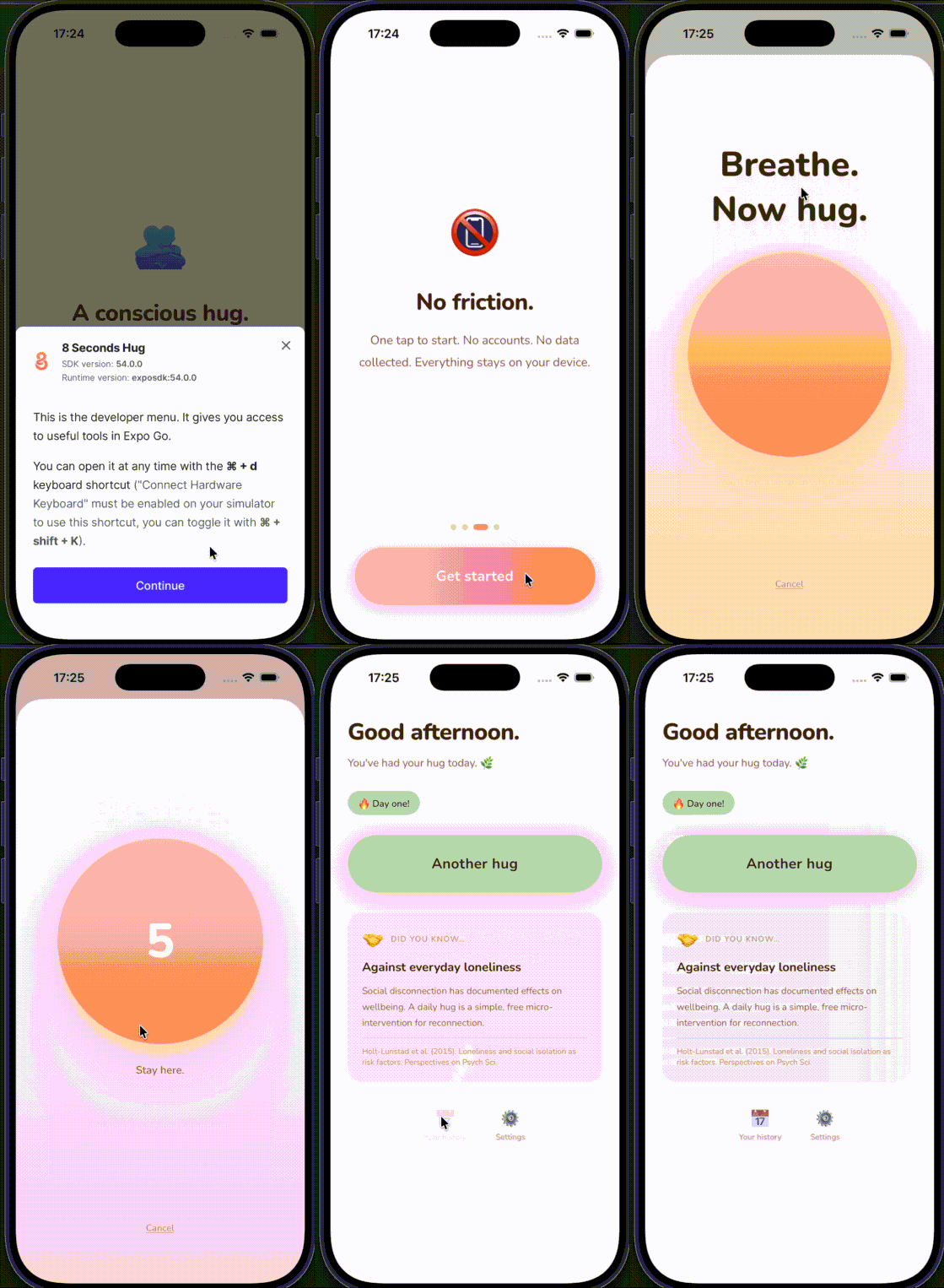
Métricas
Codex 5.4 x-high
Token usage: total=1.687.751 input=1.549.417 (+ 17.849.728 cached) output=138.334 (reasoning 68.069)